
AI Email Agent – Autonomous Outreach System
2025

AI Email Agent – Autonomous Outreach System
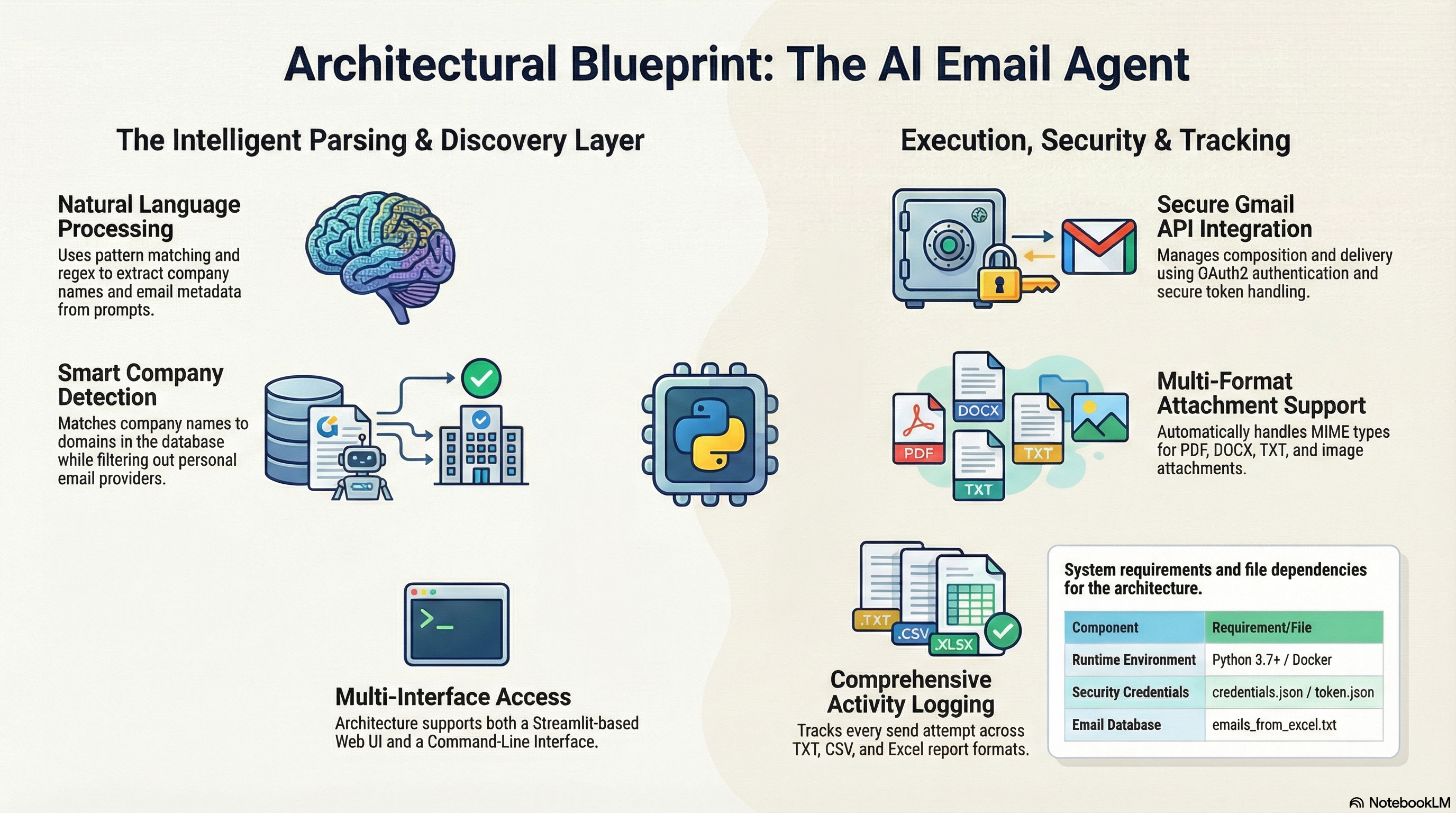
The AI Email Agent is an intelligent automation system designed to eliminate the manual labor of searching for corporate contacts and sending personalized outreach. By leveraging Natural Language Processing (NLP), the agent allows users to simply provide a command in plain English, such as "Send a mail to microsoft," and it handles the entire discovery and dispatch process.
The Core Technology Stack
To build this agent, I utilized a robust stack focused on security, scalability, and ease of use:
Pre-requisites for Setup
Before the agent can function, several environmental configurations are necessary:
1. Google Cloud Project: You must create a project in the Google Cloud Console and enable the Gmail API
2. OAuth Credentials: You need to configure an OAuth consent screen and download the credentials.json file, placing it in the project root directory
3. Email Database: A file named emails_from_excel.txt must be prepared, containing a list of target email addresses formatted as one per line
4. Dependencies: All required Python packages must be installed via the requirements.txt file
How the Agent Works: Under the Hood
1. NLP-Driven Prompt Parsing
The "brain" of the agent uses regex and pattern matching to dissect natural language prompts. It identifies specific keywords like "to [company]," "subject:," and "attachments:" to extract essential data without requiring structured forms. For example, the agent can automatically extract the company name from "Send email to apple company" or identify attachment names from "attach resume.pdf".
2. Smart Company Discovery Logic
Once a company name is extracted, the agent performs a deep search in the local database. The matching logic is case-insensitive and focuses on domain extraction; if you type "microsoft," it looks for all emails ending in @microsoft.com. Crucially, the agent includes a personal email filter that automatically excludes non-professional domains like gmail.com, yahoo.com, and outlook.com.
3. Secure Authentication and Dispatch
On its first run, the agent initiates a Google OAuth flow, opening a browser window to grant permissions. It then generates a token.json file to manage future sessions securely without re-authentication. When sending, the agent creates a MIME message, detects file types automatically for attachments, and transmits the data via the Gmail API.
4. Real-time Tracking and Logging
Every action is recorded to ensure reliability. The agent maintains four distinct logs:
User Interaction Models
Web Interface (Streamlit)
The web UI provides a beautiful interface where users can authenticate with one click, type prompts, and upload multiple files (PDF, DOCX, TXT, or images) through a visual uploader. It features a visual progress bar and a sidebar showing real-time statistics of sent and failed emails.
CLI Interface
The CLI version is built for efficiency, supporting interactive multi-line input for email bodies. Users can type END on a new line to finish their message or CANCEL to abort the process. It also includes a command to list companies, allowing users to see exactly which organizations are currently in their database.
Project Architecture
The system follows a modular architecture:
Main Application Files:
Supporting Files:
Technical Implementation Details
Prompt Parsing Algorithm
The agent uses multiple regex patterns to extract information:
Company Matching Algorithm
1. Extract domain from email: email.split("@")[1]
2. Extract main domain: domain.split(".")[0]
3. Compare: main_domain.lower() == company_name.lower()
4. Filter: Skip personal emails (gmail.com, outlook.com, etc.)
Email Composition
The agent creates a MIME (Multipurpose Internet Mail Extensions) message with:
Gmail API Integration
Uses OAuth2 flow for secure authentication:
1. Check if token.json exists
2. If expired, refresh token
3. If invalid, start OAuth flow
4. Build Gmail API service object
5. Send emails via API
Challenges & Solutions
Challenge: Natural Language Understanding
Problem: Users might phrase requests in many different ways.
Solution: Multiple regex patterns to match different phrasings, case-insensitive matching, and fallback to manual input if extraction fails.
Challenge: Gmail API Rate Limits
Problem: Gmail API has rate limits (250 quota units per user per second).
Solution: Batch processing with delays, automatic retry with longer delays for rate limit errors (429), and tracking sent emails to avoid duplicates.
Challenge: Email Delivery Failures
Problem: Some emails might fail due to invalid addresses or mailbox issues.
Solution: Detect delivery failure errors, log to not_sent.txt with error reason, and don't retry permanent failures.
Best Practices for Use
To get the most out of the agent, users should follow these guidelines:
Future Enhancements
Potential improvements include:
Conclusion
This AI Email Agent project demonstrates end-to-end agent design: perception, planning, action, verification, and memory. It solves a real-world problem (automated job applications) using modern technologies and best practices. The system combines natural language processing, API integration, web development, and comprehensive logging to create a production-ready solution that can be extended and customized for various use cases.