
← Back to Blogs

Autonomous Financial Analysis & Trading Agent

2025

Autonomous Financial Analysis & Trading Agent

Financial Analysis & Trading Agent - Comprehensive Guide


Introduction & Project Overview


What Is This Project?


This is an AI-powered autonomous trading agent that:


  • Analyzes stock market data using Large Language Models (LLMs)
  • Builds trading strategies based on market sentiment
  • Backtests strategies on historical data
  • Executes paper trades (simulated trading with real market prices)
  • Self-improves by learning from performance

  • Why Was It Created?


    The goal is to demonstrate how AI agents can be used for financial analysis and automated trading. This project combines:


  • Modern AI/LLM capabilities for market analysis
  • LangGraph for building stateful agent workflows
  • Real market data integration
  • Risk-free paper trading for testing

  • Key Features


    ✓ AI-Powered Market Analysis using free/open-source LLMs

    ✓ LangGraph-Based Workflow (7 intelligent nodes)

    ✓ Real-Time Market Data from Alpaca API

    ✓ Backtesting Engine for strategy validation

    ✓ Paper Trading (risk-free simulation)

    ✓ Beautiful CLI Interface with Rich library

    ✓ Multi-LLM Support (Ollama, Hugging Face, Groq, OpenAI)

    ✓ Self-Improvement Capabilities


    Requirements & Technology Stack


    Python 3.11+ (Tested with Python 3.14)


    WHY:** Modern Python features, better performance, type hints support


    WHERE USED: Entire project is Python-based


    LangChain & LangGraph


    WHY:

  • LangChain provides LLM abstraction layer
  • LangGraph enables stateful agent workflows
  • Makes it easy to switch between LLM providers
  • Provides structured way to build multi-step agents

  • WHERE USED:

  • agents/trading_agent.py: Main workflow orchestration
  • strategies/strategy_builder.py: LLM-powered analysis
  • llm/llm_provider.py: Multi-provider LLM abstraction

  • Alpaca Trade API


    WHY:

  • Free paper trading account
  • Real market data (with limitations on free tier)
  • Professional-grade trading API
  • No real money risk

  • WHERE USED:

  • data/market_data_fetcher.py: Fetches historical and real-time data
  • trading/paper_trader.py: Executes paper trades

  • yFinance (Fallback)


    WHY:

  • Free alternative when Alpaca fails
  • No API keys required
  • Good for historical data
  • Handles SIP subscription issues

  • WHERE USED:

  • data/market_data_fetcher.py: Fallback data source

  • LLM Providers (Multiple Options)


    WHY MULTIPLE OPTIONS:

  • Ollama: Free, local, privacy-focused, no API limits
  • Hugging Face: Free API tier, many models
  • Groq: Very fast inference, free tier
  • OpenAI: Best quality, but paid

  • WHERE USED:

  • llm/llm_provider.py: Unified provider abstraction
  • strategies/strategy_builder.py: Market analysis and strategy building

  • InfluxDB (Optional)


    WHY:

  • Time-series database optimized for financial data
  • Stores price data, trades, performance metrics
  • Optional - system works without it (in-memory fallback)

  • WHERE USED:

  • data/database.py: Stores all time-series data

  • Rich Library


    WHY:

  • Beautiful terminal output
  • Tables, panels, colors
  • Progress bars
  • Professional CLI interface

  • WHERE USED:

  • cli/interface.py: All CLI display logic

  • Architecture & Design


    Project Structure


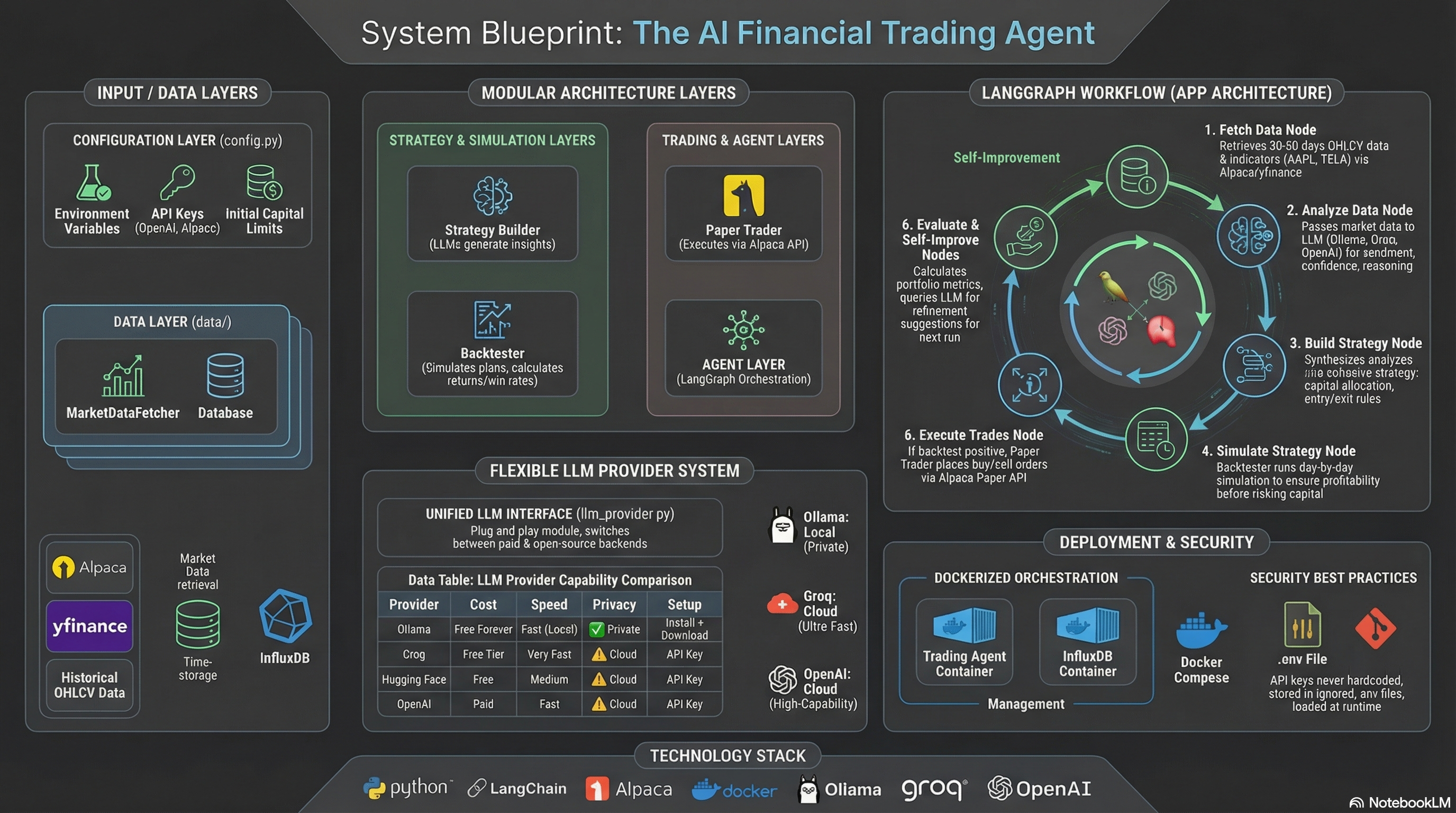
    The project follows a modular architecture:


    Main Components:

  • agents/trading_agent.py: Main LangGraph agent (orchestrates workflow)
  • cli/interface.py: Beautiful CLI interface
  • data/market_data_fetcher.py: Alpaca/yfinance integration
  • data/database.py: InfluxDB/in-memory storage
  • llm/llm_provider.py: Multi-LLM provider abstraction
  • strategies/strategy_builder.py: LLM-powered strategy generation
  • simulation/backtester.py: Backtesting engine
  • trading/paper_trader.py: Alpaca paper trading
  • config.py: Configuration management
  • main.py: Entry point

  • LangGraph Workflow (7 Nodes)


    The agent follows a stateful workflow with 7 nodes:


    1. FETCH_DATA → Fetches market data for symbols

    2. ANALYZE_DATA → LLM analyzes each symbol

    3. BUILD_STRATEGY → LLM creates trading strategy

    4. SIMULATE_STRATEGY → Backtests on historical data

    5. EXECUTE_TRADES → Paper trades (if backtest positive)

    6. EVALUATE_PERFORMANCE → Calculates metrics

    7. SELF_IMPROVE → LLM suggests improvements


    State Management


    The agent uses a TypedDict for state management, tracking symbols, market data, analysis results, strategy, backtest results, execution plans, performance metrics, iteration count, and errors.


    Complete Code Walkthrough


    Entry Point: main.py


    EXECUTION FLOW:

    1. Parses command-line arguments for symbols

    2. Initializes CLI interface

    3. Creates TradingAgent instance

    4. Runs workflow with symbols

    5. Displays results using CLI


    Node 1: FETCH_DATA


    WHAT IT DOES:

  • Fetches historical price data for each symbol
  • Calculates technical indicators (SMA, volatility, price change)
  • Stores data in database
  • Prepares data for analysis

  • CODE LOCATION: agents/trading_agent.py, _fetch_data_node()


    The data fetcher tries Alpaca first, then falls back to yfinance if needed. It uses 60+ day old data to avoid SIP subscription restrictions on free Alpaca accounts.


    Node 2: ANALYZE_DATA


    WHAT IT DOES:

  • Uses LLM to analyze market data for each symbol
  • Determines sentiment (bullish/bearish/neutral)
  • Extracts entry/target prices
  • Calculates confidence levels
  • Provides reasoning

  • CODE LOCATION: agents/trading_agent.py, _analyze_data_node()

    strategies/strategy_builder.py, analyze_market_data()


    The LLM receives formatted market data including recent prices, technical indicators, and price changes, then provides analysis with sentiment and confidence scores.


    Node 3: BUILD_STRATEGY


    WHAT IT DOES:

  • Combines all symbol analyses into a trading strategy
  • Allocates capital based on sentiment and confidence
  • Defines entry/exit conditions
  • Sets position sizes

  • CODE LOCATION: agents/trading_agent.py, _build_strategy_node()

    strategies/strategy_builder.py, build_strategy()


    The strategy builder uses LLM to create a cohesive trading strategy from all symbol analyses, with capital allocation based on sentiment (bullish gets higher allocation) and confidence levels.


    Node 4: SIMULATE_STRATEGY (Backtesting)


    WHAT IT DOES:

  • Simulates strategy on historical data
  • Executes trades day-by-day
  • Calculates returns, win rate, trade count
  • Validates strategy before live trading

  • CODE LOCATION: agents/trading_agent.py, _simulate_strategy_node()

    simulation/backtester.py, run_backtest()


    The backtester simulates day-by-day, checking entry conditions (flexible 5% tolerance on entry price) and exit conditions (target price or 10% stop loss). It tracks all trades and calculates final performance metrics.


    Node 5: EXECUTE_TRADES


    WHAT IT DOES:

  • Executes paper trades on Alpaca (if backtest positive)
  • Places buy orders for recommended symbols
  • Manages position sizes
  • Tracks executed vs skipped trades

  • CODE LOCATION: agents/trading_agent.py, _execute_trades_node()

    trading/paper_trader.py, execute_buy_order()


    Only executes if backtest shows positive returns. Checks buying power, places market orders via Alpaca API, and stores trades in database.


    Node 6: EVALUATE_PERFORMANCE


    WHAT IT DOES:

  • Calculates portfolio metrics
  • Gets account summary from Alpaca
  • Stores performance data
  • Tracks portfolio value, cash, positions

  • CODE LOCATION: agents/trading_agent.py, _evaluate_performance_node()


    Tracks portfolio value, backtest returns, win rate, and stores metrics for future analysis.


    Node 7: SELF_IMPROVE


    WHAT IT DOES:

  • Uses LLM to analyze performance
  • Suggests improvements for strategy
  • Provides actionable recommendations
  • Can be used in future iterations

  • CODE LOCATION: agents/trading_agent.py, _self_improve_node()


    The LLM analyzes backtest results, portfolio performance, and suggests improvements for entry/exit criteria, position sizing, risk management, and symbol selection.


    How Everything Works Together


    Complete Execution Flow


    STEP 1: USER RUNS COMMAND

    User executes: python main.py --symbols "AAPL,MSFT,TSLA"


    STEP 2: AGENT INITIALIZATION

    TradingAgent creates all components: MarketDataFetcher, TimeSeriesDB, StrategyBuilder, Backtester, PaperTrader, and builds the LangGraph workflow.


    STEP 3: WORKFLOW EXECUTION

    The workflow executes all 7 nodes sequentially:

  • Fetch data from Alpaca/yfinance
  • Analyze each symbol with LLM
  • Build strategy from analyses
  • Backtest strategy on historical data
  • Execute paper trades (if positive)
  • Evaluate performance metrics
  • Get improvement suggestions

  • STEP 4: RESULTS DISPLAY

    CLI displays all results with beautiful formatting using Rich library.


    Features & Capabilities


    AI-Powered Analysis

  • Uses LLMs to analyze market data
  • Understands context and relationships
  • Provides reasoning for decisions
  • Adapts to market conditions

  • Multi-LLM Support

    Supports 4 LLM providers:

    1. Ollama (Free, Local, Recommended) - No API limits, privacy-focused

    2. Hugging Face (Free API) - Many models available

    3. Groq (Free Tier, Fast) - Very fast inference

    4. OpenAI (Paid) - Best quality


    Flexible Backtesting

  • Simulates strategies on historical data
  • Flexible entry conditions (5% tolerance)
  • Fallback logic for missing prices
  • Calculates returns, win rate, trade count

  • Paper Trading

  • Risk-free trading simulation
  • Real market prices
  • Real-time execution
  • Position tracking

  • Beautiful CLI

  • Rich library for formatting
  • Color-coded output
  • Tables and panels
  • Progress indicators

  • Setup & Configuration


    Installation Steps


    1. Install Python 3.11+

    2. Clone repository

    3. Install dependencies: pip install -r requirements.txt

    4. Copy env.example to .env

    5. Configure API keys in .env

    6. Run: python main.py


    Environment Variables (.env)


    Required:

  • ALPACA_API_KEY: Your Alpaca API key
  • ALPACA_SECRET_KEY: Your Alpaca secret key

  • LLM Provider (choose one):

  • LLM_PROVIDER: ollama, huggingface, groq, or openai
  • OLLAMA_MODEL: llama3.2 (if using Ollama)
  • HUGGINGFACE_API_KEY: (if using Hugging Face)
  • GROQ_API_KEY: (if using Groq)
  • OPENAI_API_KEY: (if using OpenAI)

  • Optional:

  • INFLUXDB_TOKEN: For data persistence
  • INITIAL_CAPITAL: Starting capital (default: 100000)
  • SYMBOLS: Default symbols to analyze

  • Usage Examples


    Basic Usage


    # Run with default symbols from .env
    python main.py
    
    # Run with custom symbols
    python main.py --symbols "AAPL,MSFT,TSLA"
    
    # Run with multiple symbols
    python main.py --symbols "AAPL,MSFT,GOOGL,AMZN,TSLA"

    Windows Quick Start


    # Double-click:
    start_trading_agent.bat          # Uses default symbols
    start_trading_agent_custom.bat   # Prompts for symbols

    Troubleshooting & Common Issues


    Issue: "Python is not installed"

    SOLUTION: Install Python 3.11+ from python.org. Make sure to check "Add Python to PATH"


    Issue: "Module not found"

    SOLUTION: Run pip install -r requirements.txt. Use virtual environment: python -m venv venv


    Issue: "Ollama not found"

    SOLUTION: Install from ollama.ai. Run ollama serve in terminal. Download model: ollama pull llama3.2


    Issue: "Alpaca API error"

    SOLUTION: Check API keys in .env. Verify paper trading account is active. Free accounts have data limitations (use older dates)


    Issue: "Backtest shows 0% return"

    SOLUTION: Check entry conditions in strategy. Verify historical data is available. See issues/14-fixed-backtest-zero-trades.md


    Fixes Applied


    1. Flexible entry price matching (5% tolerance)

    2. Fallback entry logic for bullish stocks

    3. Improved date matching

    4. Better error handling

    5. Rate limiting for API calls


    Future Enhancements


    Potential improvements include:

  • Real-time streaming data
  • More technical indicators
  • Machine learning models
  • Web dashboard
  • Mobile app
  • More sophisticated risk management
  • Portfolio optimization
  • Multi-timeframe analysis
  • News sentiment analysis
  • Social media sentiment

  • Conclusion


    This Financial Analysis & Trading Agent demonstrates:


  • How to build AI agents with LangGraph
  • Integration of LLMs for financial analysis
  • Real market data integration
  • Backtesting and paper trading
  • Beautiful CLI interfaces
  • Production-ready error handling

  • The project is fully functional and can be extended with additional features as needed. All code is well-documented and follows best practices.


    Key Takeaways


    1. LangGraph enables stateful agent workflows

    2. LLMs can analyze financial data effectively

    3. Paper trading is essential for testing

    4. Backtesting validates strategies before execution

    5. Multi-provider support increases flexibility

    6. Beautiful CLI improves user experience

    7. Error handling ensures robustness